
Download Skyla – AI‑Powered Shopify Customer Support Chatbot
Overview
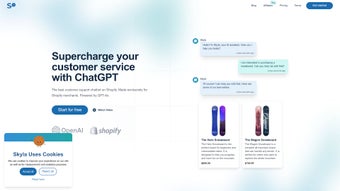
Skyla is an AI‑driven chatbot purpose‑built for Shopify merchants who want to provide instant, round‑the‑clock customer service without the overhead of a full‑time support team. Leveraging OpenAI’s ChatGPT, the bot can answer product‑specific questions, suggest complementary items, handle order‑status look‑ups, and even walk shoppers through the checkout process. The app installs with a single click from the Shopify App Store, integrates directly into any Shopify theme, and offers a highly customizable interface so the bot can speak in the exact voice of your brand.
A clean, data‑rich dashboard supplies real‑time insights into conversation volume, response accuracy, and customer satisfaction, allowing you to fine‑tune the experience as your store scales. Whether you run a boutique clothing shop, a niche handmade‑goods store, or a sprawling electronics marketplace, Skyla aims to become a reliable member of your support team, freeing you to focus on product development, marketing, and growth. Its cloud‑based architecture means you never need to worry about server maintenance, and all data is encrypted to meet GDPR and CCPA standards.
In short, Skyla blends conversational AI with deep Shopify integration to turn casual browsers into loyal buyers while reducing support costs.
Key Features & Customization Options
- Instant 24/7 Responses: Powered by ChatGPT, Skyla replies the moment a customer asks a question, dramatically cutting wait times and reducing cart abandonment.
- Smart Product Recommendation Engine: By analyzing browsing behavior, purchase history, and cart contents, the bot suggests complementary items, boosting average order value.
- Order Tracking Integration: Shoppers can retrieve order status, shipping updates, and tracking numbers without leaving the chat window.
- Multi‑Language Support: Skyla converses fluently in dozens of languages, making it ideal for global Shopify stores.
- Brand‑Aligned Customization: Change the bot’s avatar, colour palette, greeting messages, and tone of voice directly from the dashboard to match your brand identity.
- Smart FAQ Builder: Import existing FAQ pages or manually add common questions; Skyla learns from these entries to improve answer accuracy over time.
- Analytics & Performance Dashboard: Track conversation volume, response time, satisfaction scores, and conversion impact in real time.
- Seamless One‑Click Shopify Integration: The installer adds the chat widget to any Shopify theme without code changes.
- Secure Data Handling: All interactions are encrypted, and the app complies with GDPR, CCPA, and Shopify’s security standards.
- Scalable Architecture: Whether you handle ten or ten thousand chats per day, Skyla auto‑scales on OpenAI’s infrastructure to stay responsive.
Installation, Compatibility, Pros & Cons, and Daily Usage
Getting Skyla up and running is intentionally simple. From your Shopify admin, visit the Shopify App Store and click “Add app”. After granting the required permissions (read/write access to orders, customers, and themes), the installer completes in under a minute. Skyla automatically injects a lightweight JavaScript snippet into your store’s theme, creating a floating chat icon that appears on every page, both desktop and mobile.
Once installed, you’re redirected to the Skyla dashboard – a clean, modular interface divided into three main tabs: Chat Settings, Analytics, and Integrations. In Chat Settings, you can customize the welcome message, select the bot’s avatar, and configure language preferences. The Analytics tab presents charts for daily active chats, average response time, and conversion lift attributed to the chatbot. You can also export raw conversation logs for deeper analysis or feed them into a CRM system.
Skyla is a cloud‑based SaaS solution that works across all major browsers (Chrome, Firefox, Safari, Edge) and is fully responsive on mobile devices. Because it lives in the Shopify ecosystem, it is compatible with any Shopify plan—from Basic to Advanced—and with all Shopify‑hosted themes, including Dawn, Debut, and custom Liquid templates. No additional server or hardware requirements are needed; all processing occurs on OpenAI’s secure servers.
Pros
- 24/7 coverage eliminates missed sales opportunities.
- AI‑driven recommendations boost average order value.
- One‑click installation saves development time.
- Highly customizable to reflect brand personality.
- Rich analytics help quantify ROI.
- Scalable architecture handles traffic spikes effortlessly.
- Secure, GDPR‑compliant data handling.
- Multi‑language support expands global reach.
- Easy escalation to human agents via Slack, email, or help‑desk.
- Free 14‑day trial with full feature access.
Cons
- Initial AI training may require a few weeks of fine‑tuning for niche product lines.
- Advanced features (e.g., multi‑language support) are locked behind higher‑tier pricing.
- Dependence on internet connectivity; offline store modes are not supported.
- Escalation to human agents requires a separate help‑desk subscription.
- Custom branding options are limited to colors, avatar, and text – no full UI redesign.
Daily usage requires virtually no manual effort. The AI model handles most routine inquiries autonomously. However, if a conversation reaches a complexity threshold (e.g., a refund request or a technical issue), Skyla escalates the chat to a human agent, preserving the chat history for context.
You can set escalation rules in the Integrations tab, linking the bot to Slack, email, or a help‑desk platform like Zendesk. Additionally, the “Training” section lets you review flagged interactions and teach Skyla better responses, continuously improving its performance. Over time, merchants report a noticeable drop in support ticket volume and a steady increase in conversion rates thanks to the bot’s proactive product suggestions.
Frequently Asked Questions
Can Skyla handle refunds and returns?
Skyla can guide customers through the standard return process and provide policy information, but the final approval and refund execution must be handled by a human agent or through Shopify’s native return workflow.
Is there a free trial available?
Yes, Skyla offers a 14‑day free trial with full feature access, allowing merchants to test the chatbot on live traffic before committing to a paid plan.
How does Skyla protect customer data?
All chat data is encrypted in transit (TLS) and at rest. Skyla adheres to GDPR, CCPA, and Shopify’s security standards, and you can opt‑out of data storage for specific regions if required.
Can I integrate Skyla with my existing help‑desk?
Yes, Skyla provides native integrations with popular help‑desk platforms like Zendesk, Freshdesk, and Slack. You can route escalated chats directly to your chosen system.
What pricing plans are available?
Skyla offers three tiers: Starter (free up to 100 chats/month), Growth ($29/month for up to 2,000 chats), and Enterprise (custom pricing for unlimited chats, advanced analytics, and multi‑language support).
Does Skyla work on mobile‑only Shopify stores?
Absolutely. The chat widget is fully responsive and adapts to any screen size, ensuring a seamless experience for shoppers on smartphones and tablets.
Conclusion – Boost Your Shopify Store with Skyla Today
In the competitive world of e‑commerce, speed and personalization are decisive factors that turn browsers into buyers. Skyla delivers both by combining the conversational power of ChatGPT with deep Shopify integration. Its effortless installation, brand‑centric customization, and robust analytics give merchants a clear picture of how AI‑driven support impacts sales and customer satisfaction. While a short learning curve exists for niche product vocabularies, the payoff—24/7 coverage, higher conversion rates, and reduced support overhead—justifies the investment. If you’re ready to streamline your support workflow, increase average order value, and free up time for strategic growth, download Skyla now and experience a smarter way to serve your shoppers.
Overall Rating: 4.6 / 5
Pros: Instant response, easy setup, deep analytics, multi‑language, scalable architecture.
Cons: Requires training for niche vocab, higher tiers needed for advanced features, reliance on external help‑desk for escalations.



.png)



